Fee settings
Solving fees for us, our users and their users
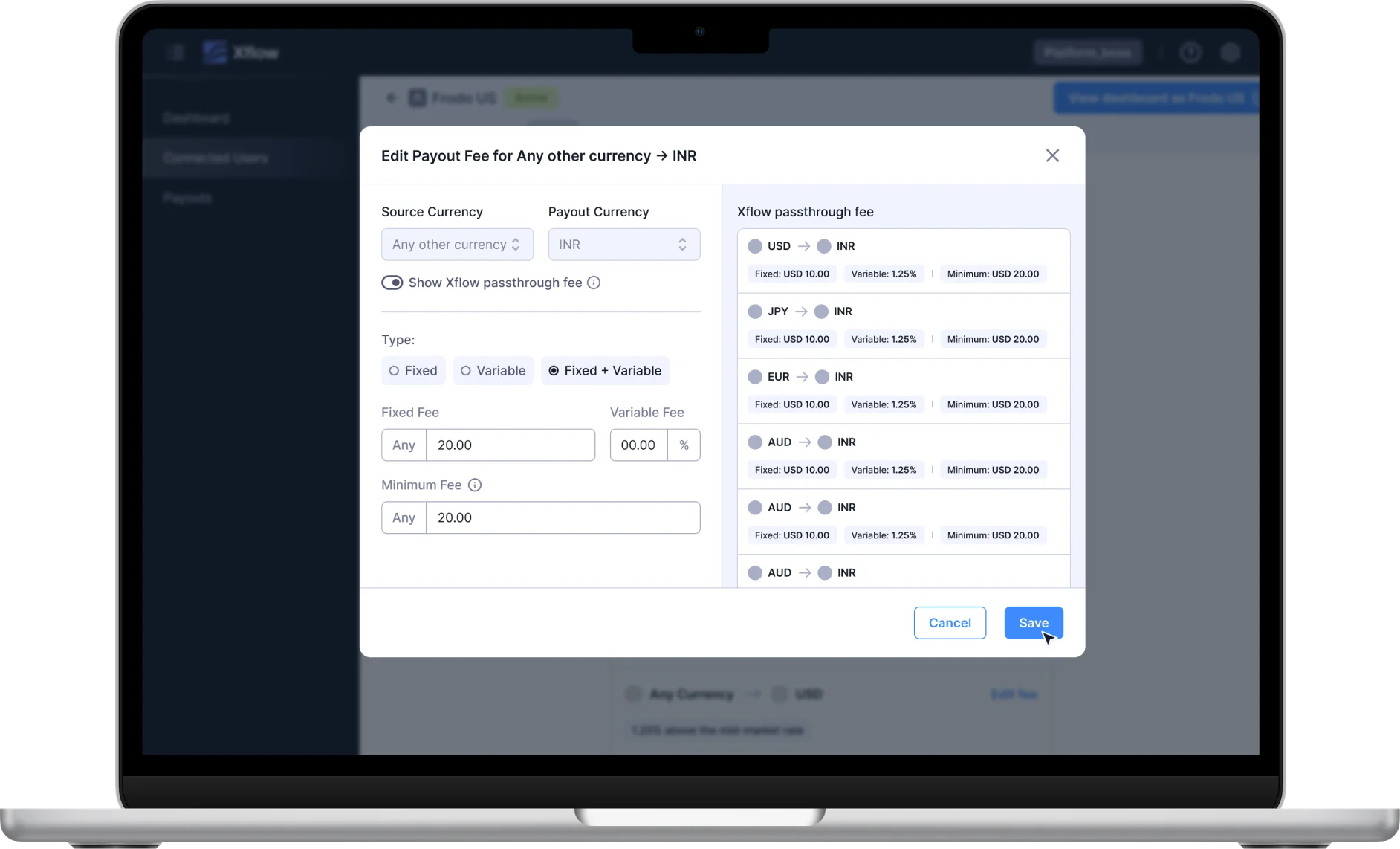
Introduction
Xflow is a B2B payment company that provides cross-border money movement. We charge a fee on every transaction. As our product evolved so did our pricing strategy and complexity. This case study details how we designed pricing on our dashboard for scalability and configurability.
Role
Lead Designer, Researcher
Team
4 people
Duration
3 months
Impact
- Reduced pricing-related user queries by 25%. Freeing up our support team to focus on more pressing issues.
- Designed for scale, works across 50+ pricing combinations and 4 user types.
Problem Statement
We had recently entered the market and were still trying to find our pricing sweet spot. Our first iteration simply showed a static line of text that mentions the fee the user was being charged. It made basic sense once it was first designed, this was our version v.0, the MVP that we shipped to users, the real users.
Then complexity hit from all sides:
- Different deals for different users: No one-size-fits-all solution. Not just the fee amounts, but even the calculation methodology varied.
- Platform Users arrived: A new user type managing their own users (Connected Users). They needed fee configurability for their users.
- Multi-currency expansion: "For all currencies converting to INR has X fees, except USD to INR, which is Y fees." The challenge was to communicate this complexity clearly without overwhelming the users.
Research & Design Principles
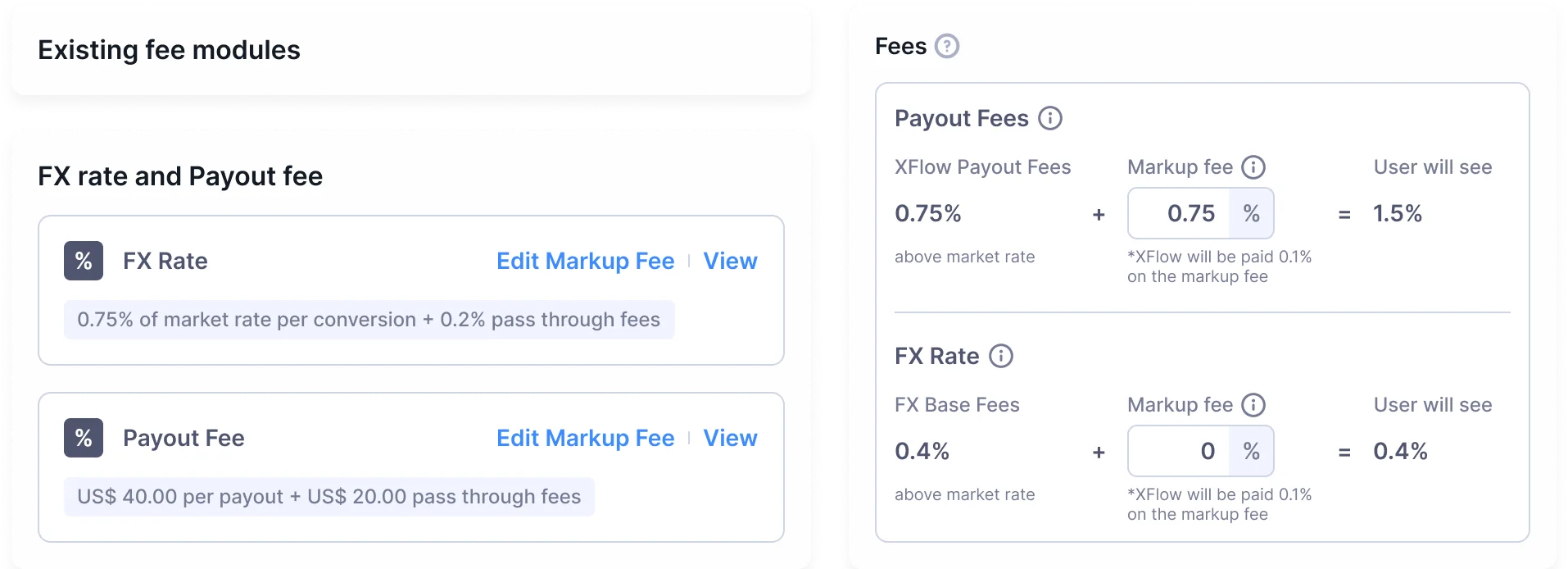
With multiple user types (Direct Users, Platform Users, Connected Users) and varying fee structures across 50+ pricing combinations, we needed clear guiding principles. We established three core principles that guided every design decision:
1. Transparency Without Overwhelm: Show the math clearly, but don't make users do the math themselves
2. Configurability at Scale: Design one interface that works for all fee combinations and user types
3. Mirror the API: Ensure dashboard and programmatic access feel consistent for Platform Users
Understanding the Fee Structures
Xflow payout Fee Structure: 1. Payout Fee: This is a fee that is charged for every transaction, this is the primary fee that we charge. 2. FX Spread: We also charge a spread on the FX. If our bank partners give us an FX rate of x, we forward it to users as (x-y), where y is the spread.
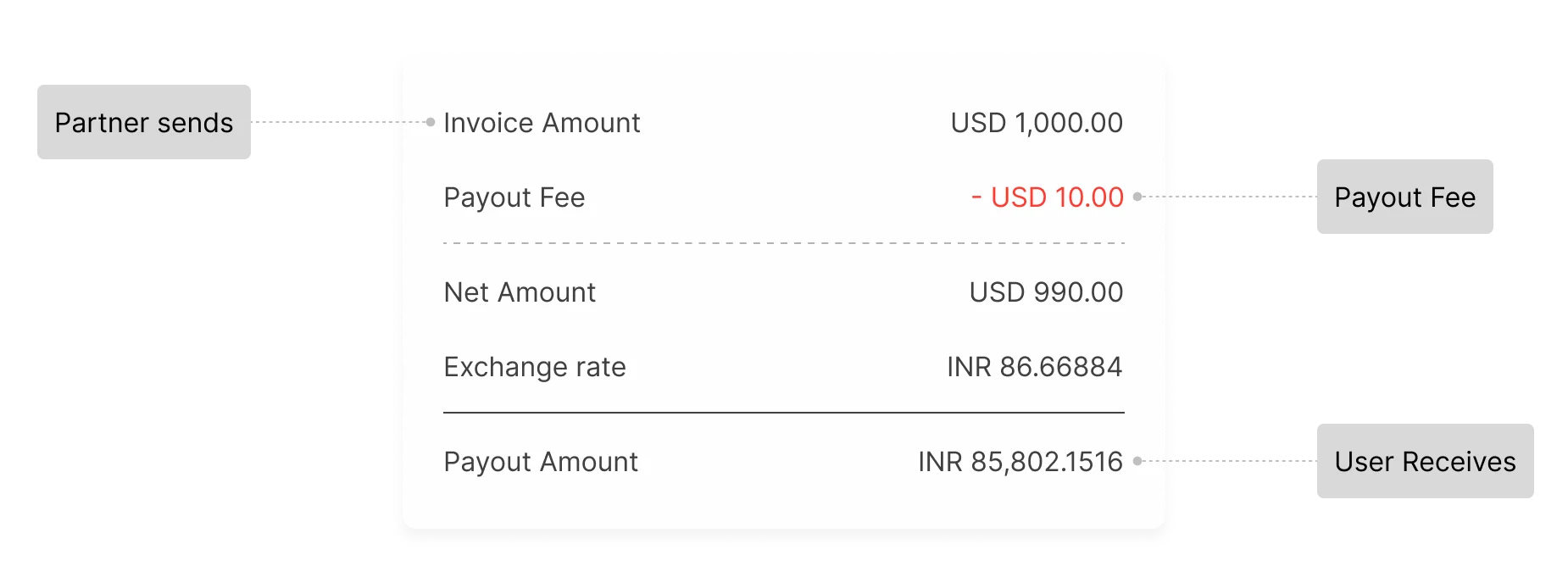
Calculating Payout FeePayout fees could be charged in multiple different configurations based on how we calculate it.
1.Using Fixed Fee A flat fee is charged, regardless of transaction amount. This may not be favourable from a revenue and scale standpoint for large transaction amounts.
2.Using Variable Fee Charging a variable / percentage of the overall transaction. This is not favourable for smaller transactions. To circumvent this, we use a min fee.
3.Using Fixed + Variable Fee A combination of two ensures a scalable fee model. Compared to variable with minimum, this is more revenue-friendly. This is the most commonly used fee type.
Platform Usecase
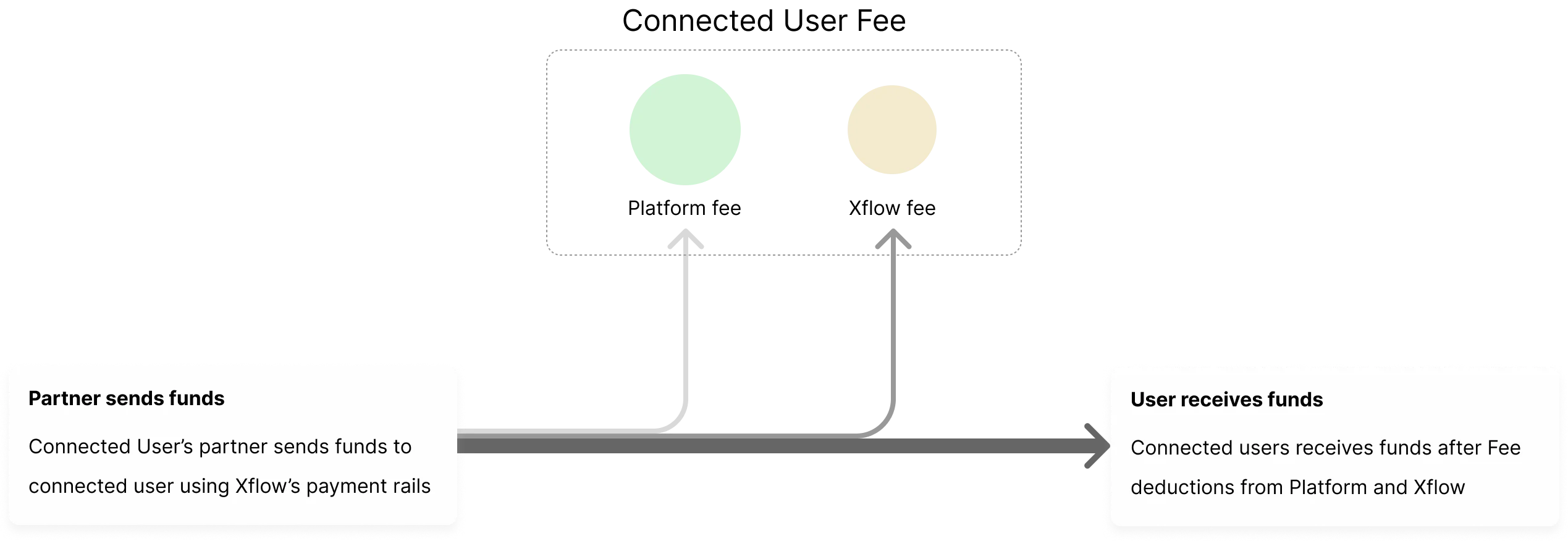
One of the biggest drivers of complexity came from our Platform Users—businesses who white-label our payment capabilities for their own users (Connected Users). This created a two-tiered fee structure: fees Xflow charges the Platform, and fees the Platform charges their Connected Users.
Fund flow and fees

Iterations for fee configurability
The design challenge: create an intuitive UI for fee configuration that mirrored our API structure, ensuring consistency between dashboard and programmatic access.
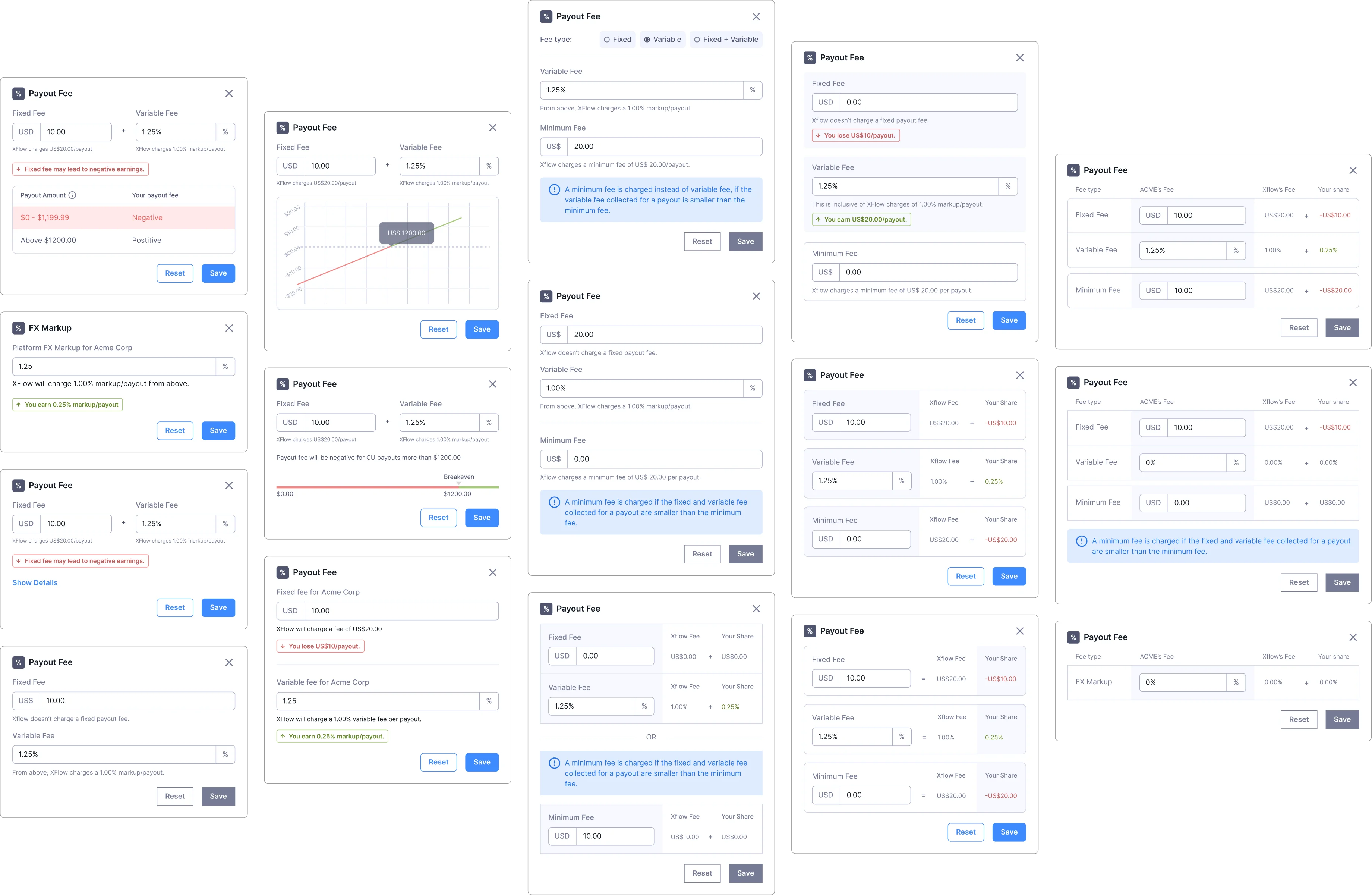
Wireframes: Single Currency
Editing fee for a Connected User
This was our stop gap solve. Updating the fee paradigm to support the Platform usecase
We went multi-currency!
This was a major achievement for us as we now offered to receive payments in 25+ currencies and not just USD to INR. We had acoomplished this after a lot of effort. We wanted to immediately extend the capability to our Platform Users. This meant we needed to re-look at our pricing model and its representation in dashboard.
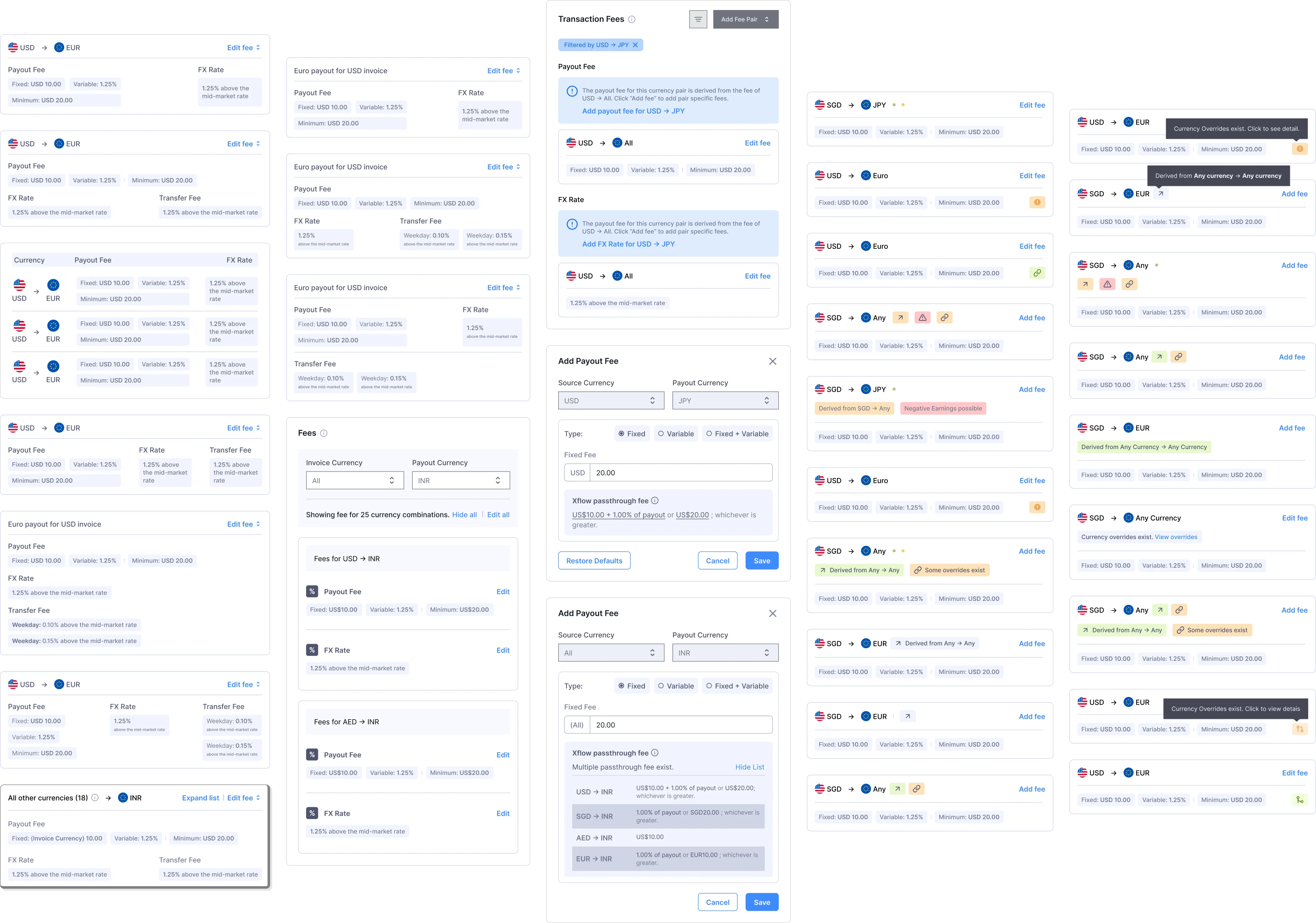
Wireframes: Introducing Multi-Currency Support
Editing fee for a Connected User
Multi-currency arrived and setting fees became slightly more complex. We introduced fallback fees!
Adding a new Fee pair
Adding a new fee pair means defining a fee for a currency corridor and moving away from the fallback fee.
Negative Earnings
Oxymoronic much?
While designing for platforms, we discovered a critical business risk: what happens when a Connected User's fee is set lower than Xflow's passthrough cost? To understand this, let's recall how fees are applied to connected users' transactions. Platform users set fees for their Connected Users. This fee includes both Xflow's and the Platform's fee. The platform can charge very high or very low; Xflow's fee remains fixed, and the delta goes to the Platform.
However, what if a Connected User's fee is set lower than Xflow's passthrough fee to the Platform?
Xflow Passthrough Fee
Xflow's share of fee
+
Platform User (PU) Fee
Platform's share of fee
=
Connected User (CU) Fee
Fee charged to connected Users
Platform's Earnings
- The Platform User earns a fee on every one of their Connected User's transactions
- When the CU fee is less than Xflow's passthrough, the Platform has to pay the deficit using earnings from other transactions
- If deficit exceeds earnings, it will lead to Negative Earnings
- This can lead to business disruption for the Platform user and its connected users.
Net Earning = Positive
Pre-funding Balance
- The Pre-funding Balance helps avoid negative earnings by nullifying them. This helps maintain business continuity
Net Earning = Negative
Wireframes: Managing Platform Earnings
Platform Earnings Flow
Managing the complex scenario where Connected User fees are lower than Xflow passthrough and Platform fees. The system prevents negative earnings through smart nullification using other earnings or the pre-funding balance.
Impact and Reflection
Impact
- Reduced pricing-related user queries by 25%, freeing up our support team to focus on more pressing issues.
- Designed for scale. Works across 50+ pricing combinations and 4 user types.
- Platform Users can now confidently configure fees for their Connected Users without constant support calls.
What We Learned Pricing transparency builds trust, but only when users understand what they're seeing. The visual fee structure graphs weren't just aesthetic choices—they reduced cognitive load by making complex calculations immediately graspable. The biggest challenge wasn't building configurability; it was communicating complexity simply.
We also learned that edge cases like Negative Earnings aren't afterthoughts—they're critical to business continuity. Designing for the 1% scenario protects the 100%.
Evolution & Next Steps Building on this foundation, we recently introduced tiered pricing to better serve SMBs. The flexible system we designed enabled this evolution without requiring a redesign. Users can, at any time, switch between pricing tiers.
View more at Xflowpay's pricing page.